Здравствуйте, adontz, Вы писали:
A>Как установить цвет показанный как жёлтый? Состояние выпадающего Month не принципиально.
A>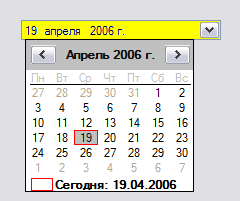
идея
здесь
using System;
using System.Windows.Forms;
using System.Drawing;
class Demo
{
    static class Program
    {
        [STAThread]
        static void Main()
        {
            Application.EnableVisualStyles();
            Application.SetCompatibleTextRenderingDefault(false);
            Application.Run(new MainForm());
        }
    }

    public class MainForm : Form
    {
        private DateTimePicker2 dtp;

        public MainForm()
        {
            this.Name = "MainForm";
            this.Text = "Demo";
               this.Size = new Size(400, 350);


            dtp = new DateTimePicker2();
            dtp.Location = new Point(12,12);
            //скрытое свойство
            dtp.BackColor = Color.Yellow;

            this.Controls.Add(this.dtp);

        }

    }


    internal class DateTimePicker2 : DateTimePicker
    {
        public DateTimePicker2()
        {
        }

        protected override void WndProc(ref Message m)
        {
            //     Check to see if message being send is WM_ERASEBKGND.
            //     The hex value of this message is hex 14.
            //     This message is sent when the background of the
            //     object needs to be erased. In our case though, instead of
            //     erasing it, we will paint a rectangle over it
            if(m.Msg == 0x14 && Enabled) // Then ' WM_ERASEBKGND
            {
                using(Graphics g = Graphics.FromHdc(m.WParam))
                {
                    g.FillRectangle(new SolidBrush(BackColor), ClientRectangle);
                }
                return;
            }
            base.WndProc(ref m);
        }
    }

}
... << RSDN@Home 1.1.4 stable SR1 rev. 568>>

